


Airtable Connector
Select Version
Airtable
Connector.
Sync Dynamically. Zero Code.
Bi-directional. Queue-driven.
Connect Odoo's robust ERP capabilities to Airtable's highly flexible, collaborative spreadsheet-databases. Airtable Connector enables businesses, developers, and administrators to configure bi-directional synchronization, handle data mappings, and manage conflict resolution directly within a clean, no-code Odoo interface.
Airtable Connector vs. Hardcoded APIs
Stop writing brittle sync scripts that break on every API update. Compare how our visual connector changes everything.
Custom API Coding (Brittle)
- Write custom Python scripts for each Odoo model and Airtable table.
- Hardcode database structures, field names, and type conversions.
- No visual dashboard; database sync problems are buried in server logs.
- Blocking requests run on user threads, causing slow interface response times.
- No built-in conflict resolution; concurrent updates simply overwrite each other.
- Must modify Odoo code and restart servers for minor field additions.
Visual Connector Style (Robust)
- Dynamic Mappings: Connect any Odoo model to Airtable tables via Odoo's UI.
- Auto-fetch Schema: Retrieve bases, tables, and columns directly from Airtable.
- Background Queue: Task workers process synchronization in asynchronous queues.
- Real-time Syncing: Real-time webhook handlers trigger instantly on changes.
- Conflict Protection: Detailed dashboard shows differences side-by-side.
- Audit Logging: Monitor sync runs, errors, payload structures, and queue jobs.
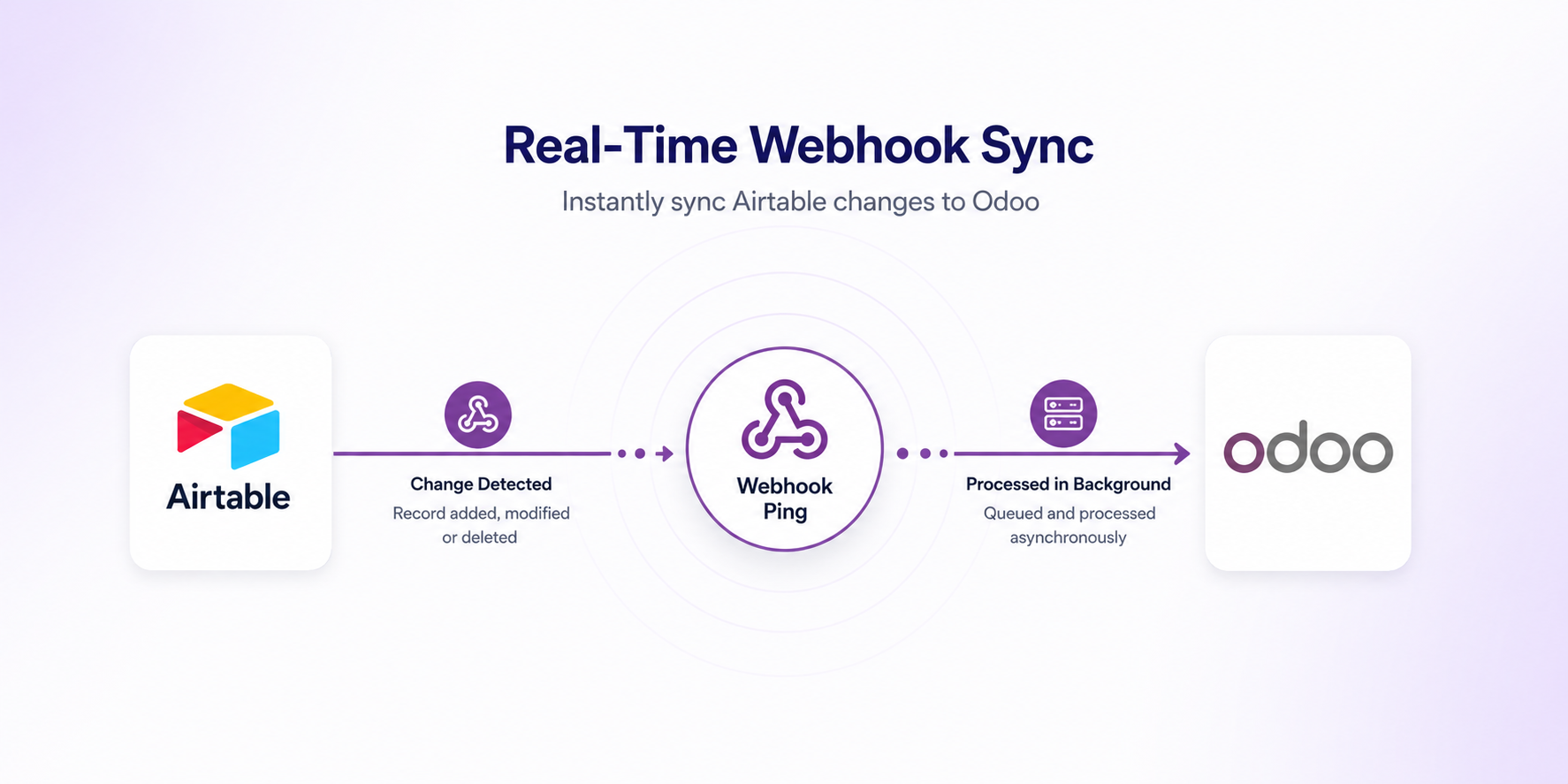
Real-Time Webhook Sync
Ditch scheduled polling. The Airtable Connector configures real-time Airtable Webhook subscriptions. Whenever data is modified, added, or deleted inside Airtable, Odoo receives an instant payload ping, enqueueing a sync job to process the changes within seconds.
How the Event-Driven Flow Works:
- Configure Profile: Setup your Airtable Personal Access Token (PAT) with webhook privileges.
- Automatic Registration: Odoo automatically creates webhook registrations inside Airtable on mapping activation.
- Instant Webhook Ping: Any change in Airtable sends a secure HTTP POST callback to Odoo.
- Asynchronous Job Queue: The worker processes the incoming data in the background, keeping your Odoo instance fast.
Token Authentication & TLS Support
Airtable Connector utilizes Airtable's latest Personal Access Tokens (PAT) conforming to modern OAuth requirements. All webhook communication utilizes cryptographically signed tokens and state verification, ensuring no unauthorized systems can spoof data synchronization inputs.
How to Sync Odoo & Airtable
Follow these 5 intuitive steps to set up seamless data flow between systems.
Profile Setup
Create a connection profile, enter your Airtable Personal Access Token (PAT), select your Base, and verify with Test Connection.
Model Mapping
Map your chosen Odoo models (e.g. Partners, Products, Orders) to their corresponding Airtable tables. Define the sync direction and conflict rules.
Field Alignment
Map individual model fields to Airtable table columns. Supports field transformations, relational models, and fallback rules.
Queue Processing
Enable automatic background synchronization. Changes are pushed and pulled via an optimized task queue with retry logic.
Conflict Control
If concurrent edits cause data overlaps, resolve discrepancies side-by-side via Odoo's conflict management system.
See the Connector in Action
Explore how easy it is to link your tables, map records, manage dynamic queues, and handle synchronization exceptions.
Monitor your entire Airtable sync ecosystem from a unified control panel. The interactive Kanban dashboard provides instant visibility into active table mappings, pending operations, sync failure queues, and unresolved data conflicts. Keep track of connector health parameters, queue distributions, and sync request ratios at a single glance.
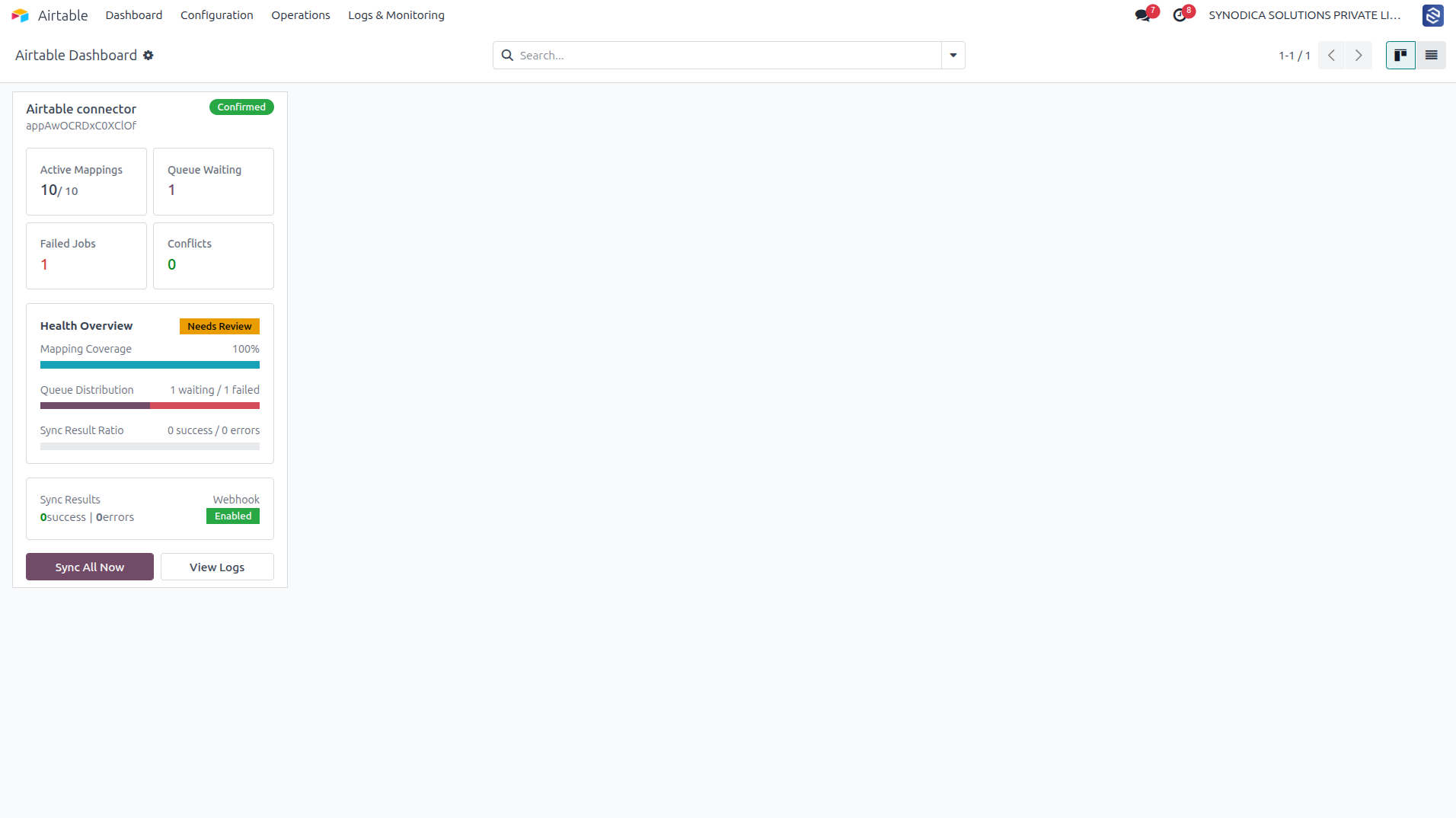
Monitor health stats, mapping coverage, and synchronization queue ratios.
- Active Mappings Displays the count of active Odoo-to-Airtable mappings. Click to view mapping list.
- Queue Waiting / Failed Tracks pending tasks and failed jobs. Click to access the Operations Queue.
- Sync All Now Triggers outbound synchronization processes for all active configuration mappings.
- View Logs Directly navigates to the sync log view grouped by success, error, and skip state.
Establish secure credentials using Airtable Personal Access Tokens (PAT) conforming to modern token authentication and OAuth requirements. Define specific Base IDs, company mappings for multi-company environments, default sync directions, and rate limiting thresholds. The built-in Test Connection validator dynamically checks credentials and scope permissions before activating the profile.
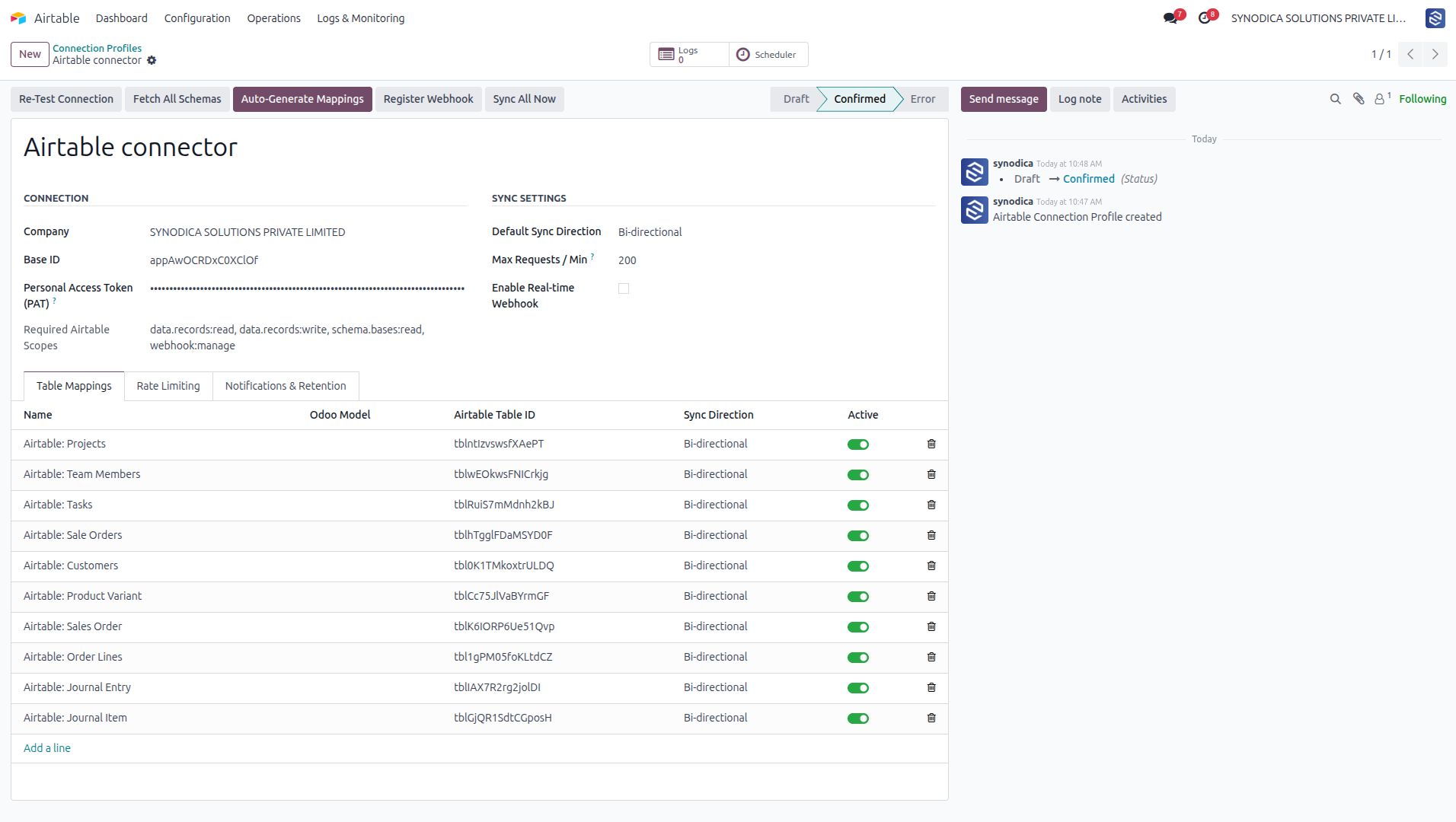
Manage credentials, tokens, bases, and cache fetched schemas.
- Test Connection Validate credentials, tokens, and access permissions to confirm connection to the remote Airtable Base.
- Fetch All Schemas Query base structure from Airtable metadata endpoints and populate Odoo's local schema caches.
- Auto-Generate Mappings Scans cached base columns and auto-creates both model and field mapping layouts.
- Register Webhook Registers Odoo callback URL inside Airtable webhook service config for real-time synchronization.
- Sync All Now Enqueues outbound background synchronization jobs for all active mappings.
Perform automated metadata scans of your remote bases. Fetch the entire table structure from your Airtable base to populate local schema caches, mapping out tables and column field types automatically. You can also auto-create new tables and columns in Airtable directly from Odoo mapping definitions, avoiding manual database schema updates on both platforms.
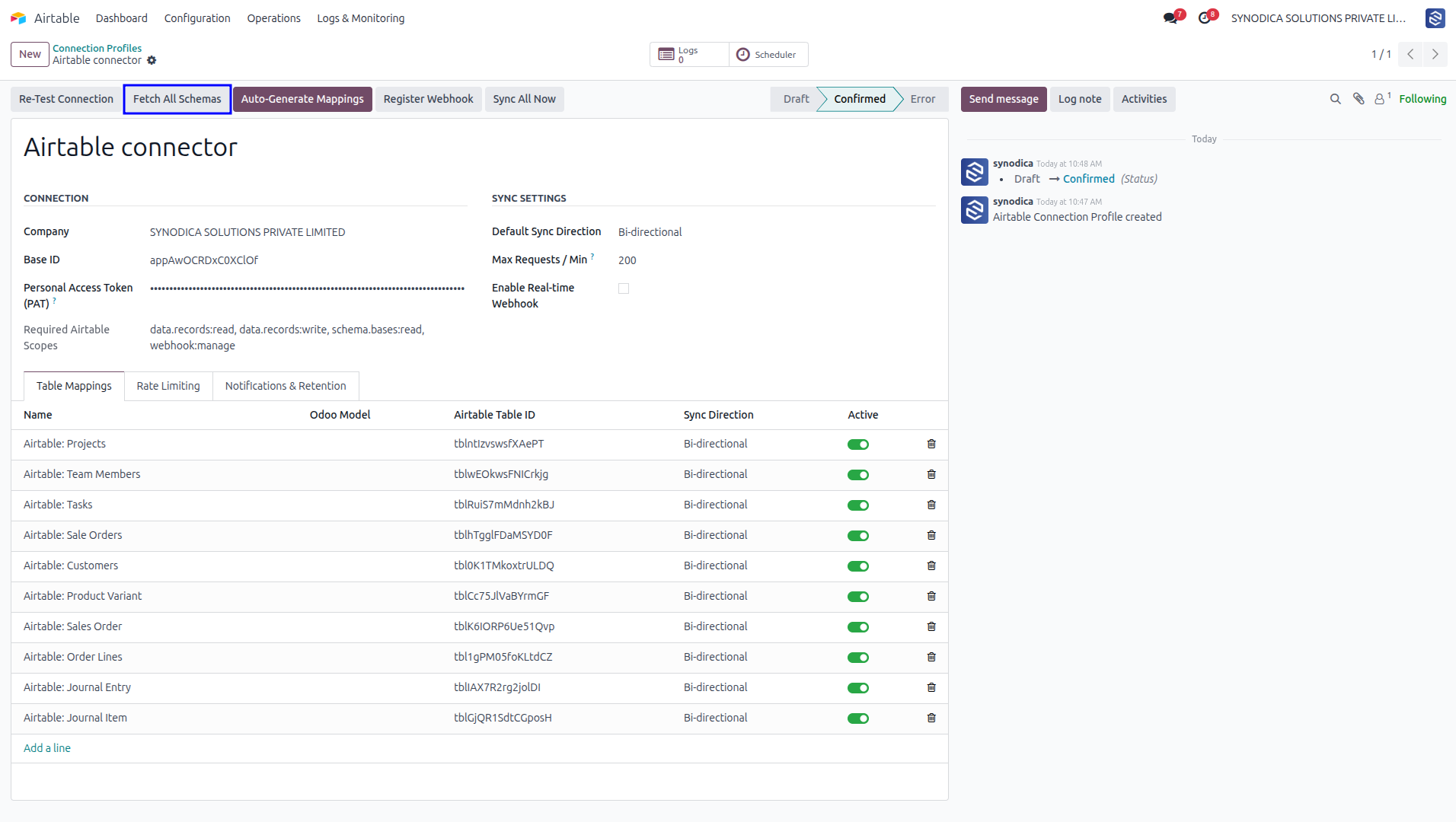
Fetch latest Airtable base changes to quickly map tables and columns.
- Fetch Schema Queries Airtable's schema metadata for the selected table to update Odoo's local cache.
- Auto-Create Table Automatically builds a matching new table structure with all fields directly in the remote Airtable Base.
Define model-level mappings between Odoo standard or custom models (such as Contacts, Products, or Sales Orders) and remote Airtable tables. Customize sync directions, configure cron execution batch sizes, choose write triggers (auto-sync on write), select conflict resolution policies (Odoo wins, Airtable wins, or manual), and apply advanced Odoo search domain filters to sync only specific record subsets.
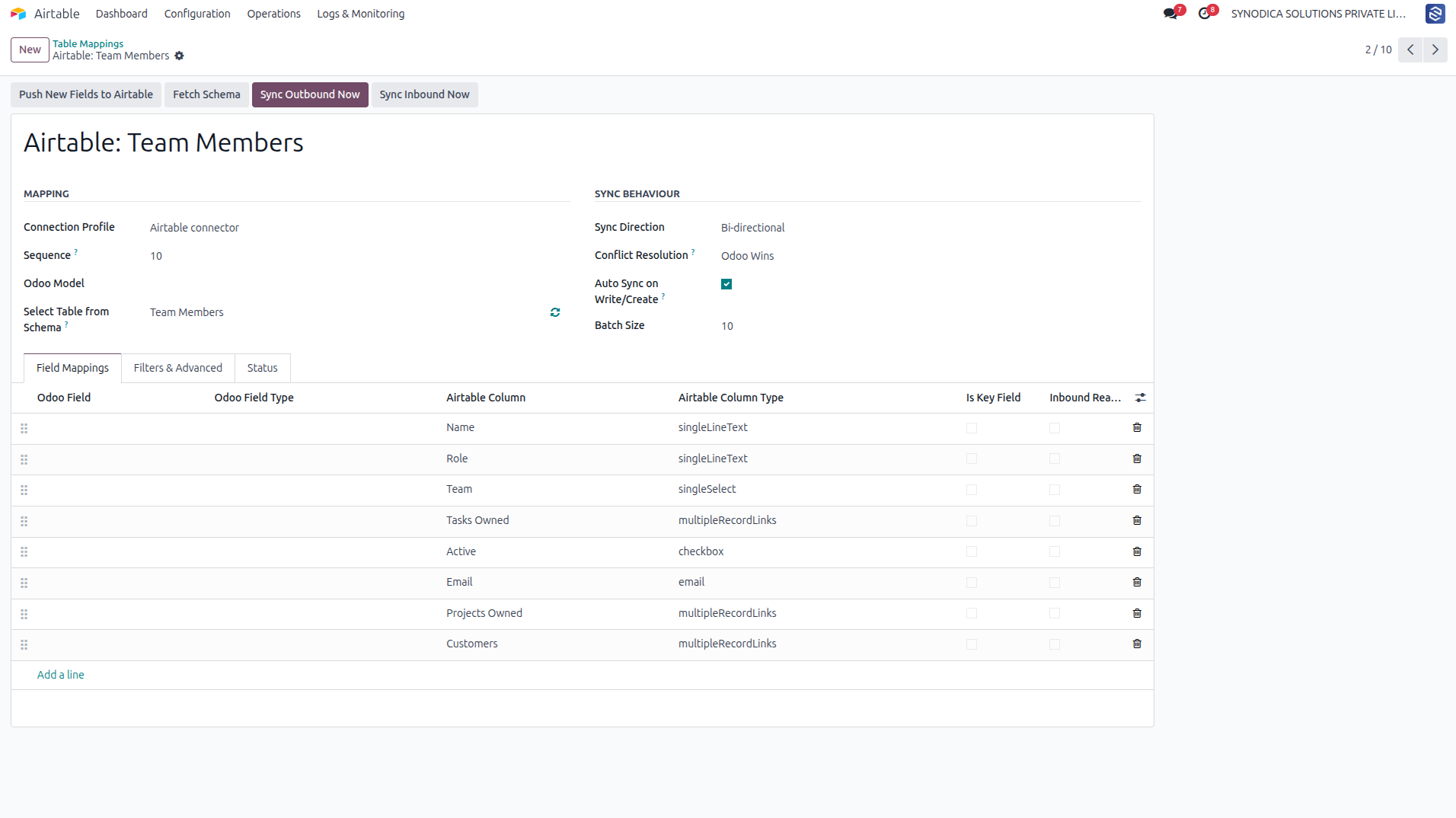
Configure sync direction (bi-directional, inbound, outbound) and custom Odoo record filters.
- Sync Outbound Now Instantly enqueues active Odoo records matching the domain filter to be pushed to Airtable.
- Sync Inbound Now Fetches and processes modifications made in the remote Airtable table directly into Odoo.
- Push New Fields Creates columns in the remote Airtable table for any newly mapped fields that do not exist yet.
Align individual database columns. Map Odoo fields to corresponding columns in the cached Airtable schema. The connector handles complex data types seamlessly: many-to-one relations with customizable mapping policies (create/ignore/raise), many-to-many fields (comma-separated or JSON lists), numerical conversions with custom null fallback policies, and inbound read-only controls.
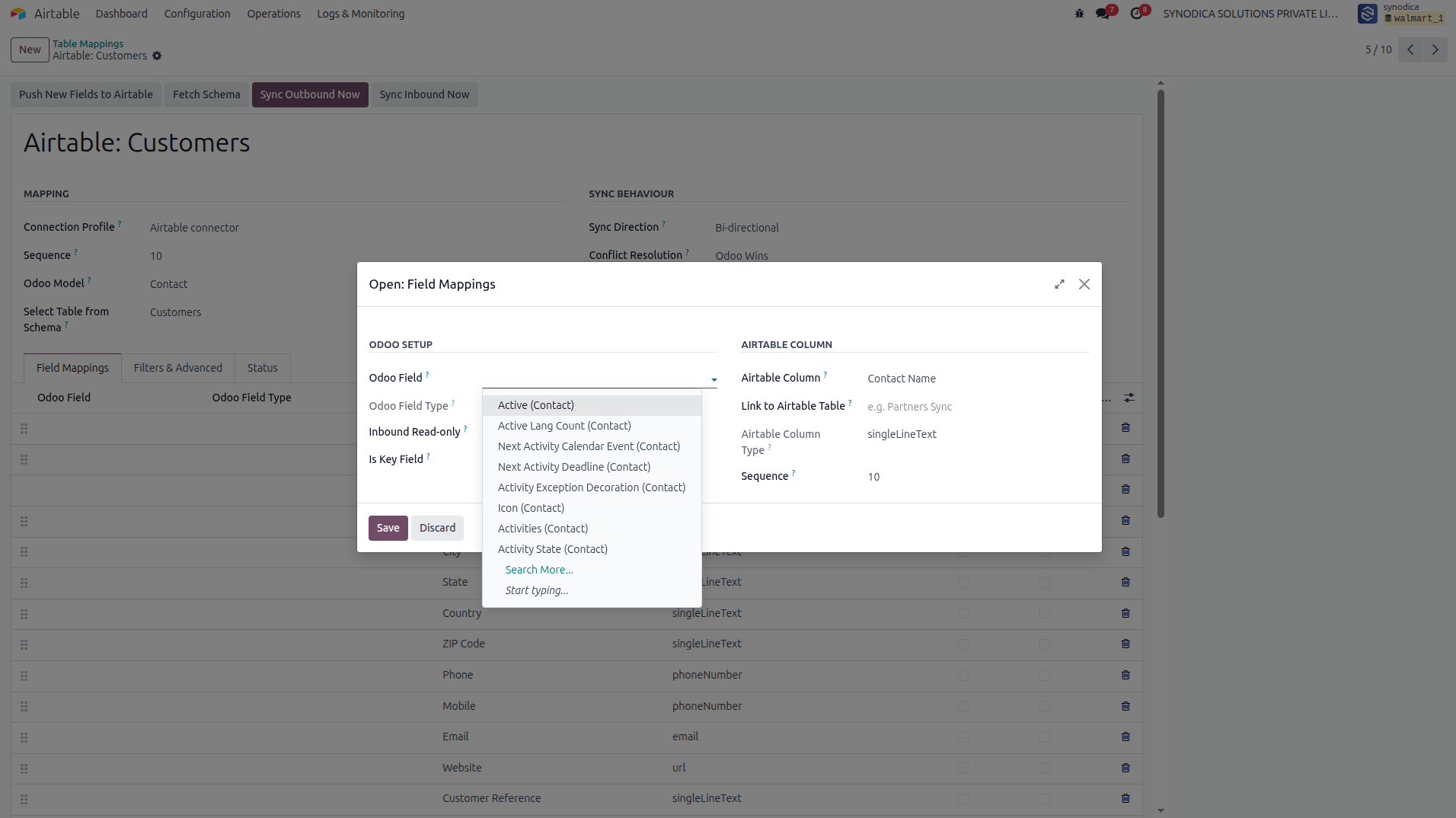
Define key columns, read-only mappings, and relational mapping policies.
- Key Field Marks a field as a unique identifier used to match records between platforms (prevents duplicates).
- Inbound Read-Only Protects Odoo records by preventing remote Airtable updates from overwriting this field.
Enable instant real-time synchronization, bypassing cron polling intervals. With webhook integration enabled, Odoo registers a webhook subscription directly in Airtable under the profile's Base. Any modifications in Airtable trigger an immediate HTTP POST callback to Odoo's secure webhook controller, instantly enqueueing a sync job to keep data unified.
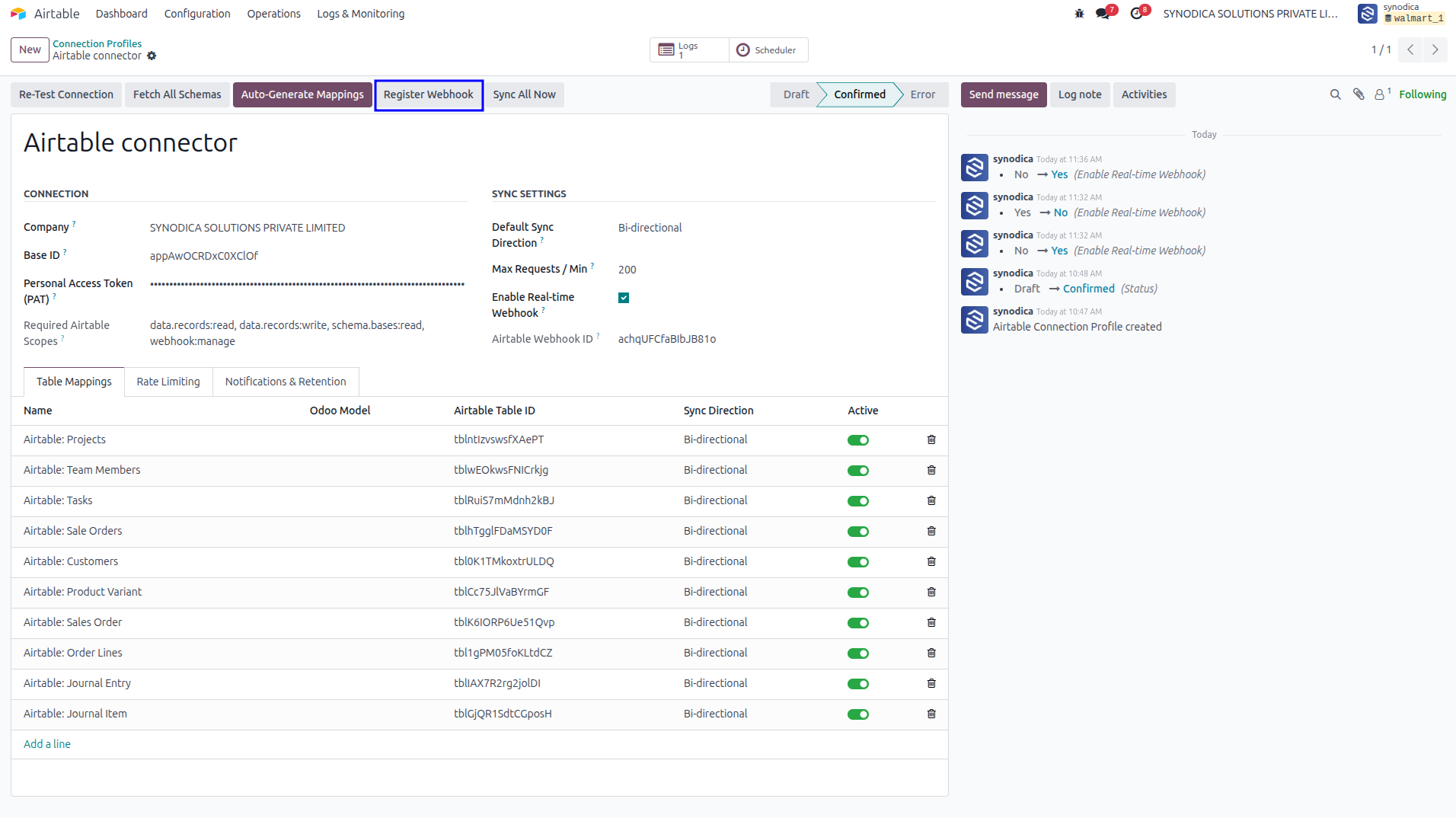
Webhook monitoring showing active payload triggers from Airtable updates.
- Webhook ID The unique subscription ID registered in Airtable for tracking update notification callbacks.
- HMAC Secret Cryptographic key used to verify incoming payloads, ensuring secure callback sources.
Ensure high-performance background execution with an asynchronous task queue. Synchronization jobs are enqueued with high, normal, or low priorities and processed in background worker threads, preventing UI lockups. Failed tasks automatically back off and retry up to maximum limits, recording complete request/response payloads, execution durations, and detailed error tracebacks.
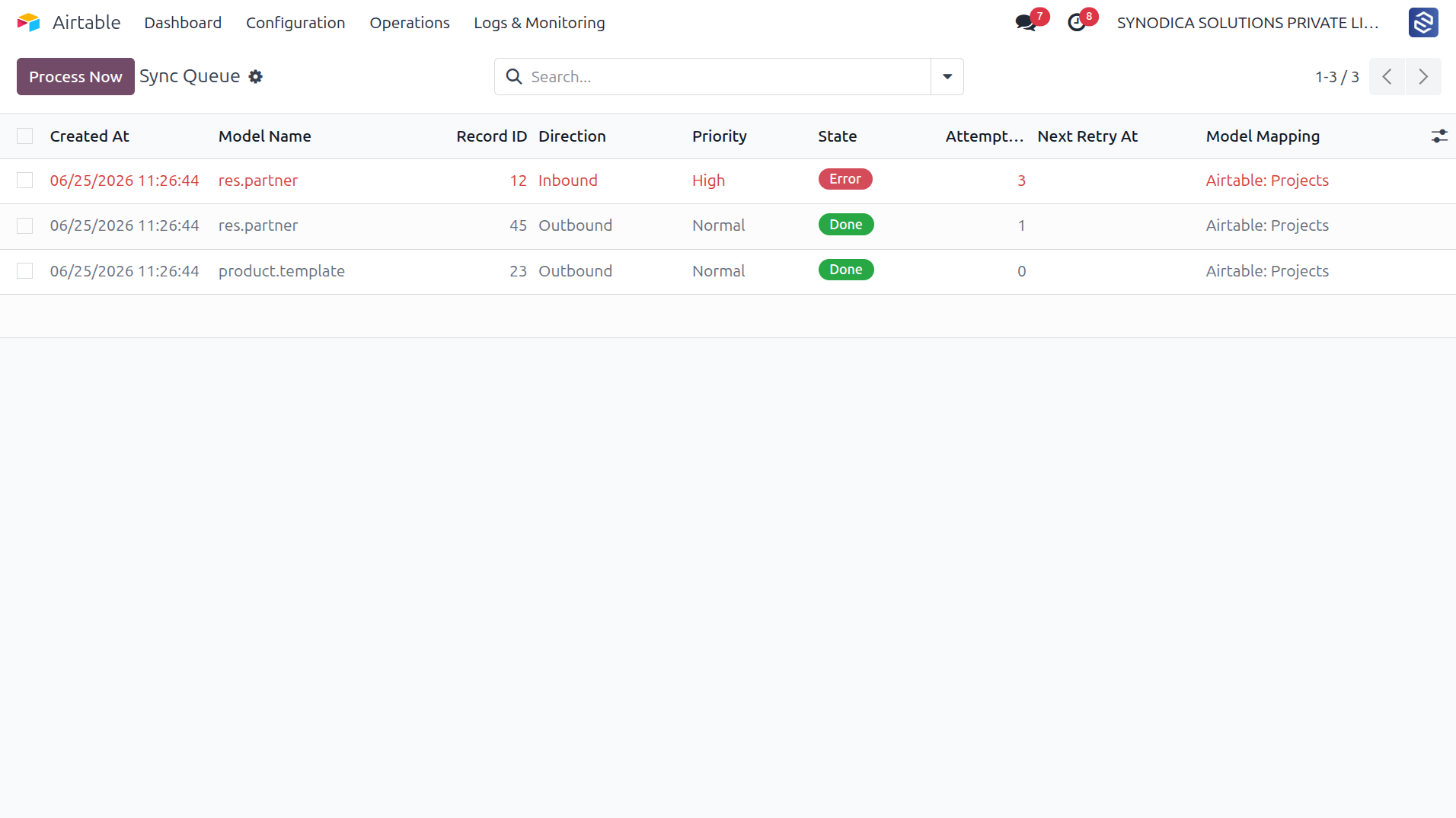
View detailed execution queue jobs, payloads, retries, and failure stack traces.
- Process Now Forces immediate synchronous processing of selected pending or failed jobs in the queue list.
- Retry Sync Re-enqueues a failed sync job after correcting any schema or token settings.
Resolve concurrent changes without data loss. If a record is modified simultaneously in both Odoo and Airtable, the connector flags a conflict and puts it in a pending state. A dedicated dashboard displays the Odoo current values and Airtable incoming values side-by-side in JSON code editors, allowing users to apply custom resolutions (Odoo Wins, Airtable Wins, or Manual overrides) with detailed resolution notes.
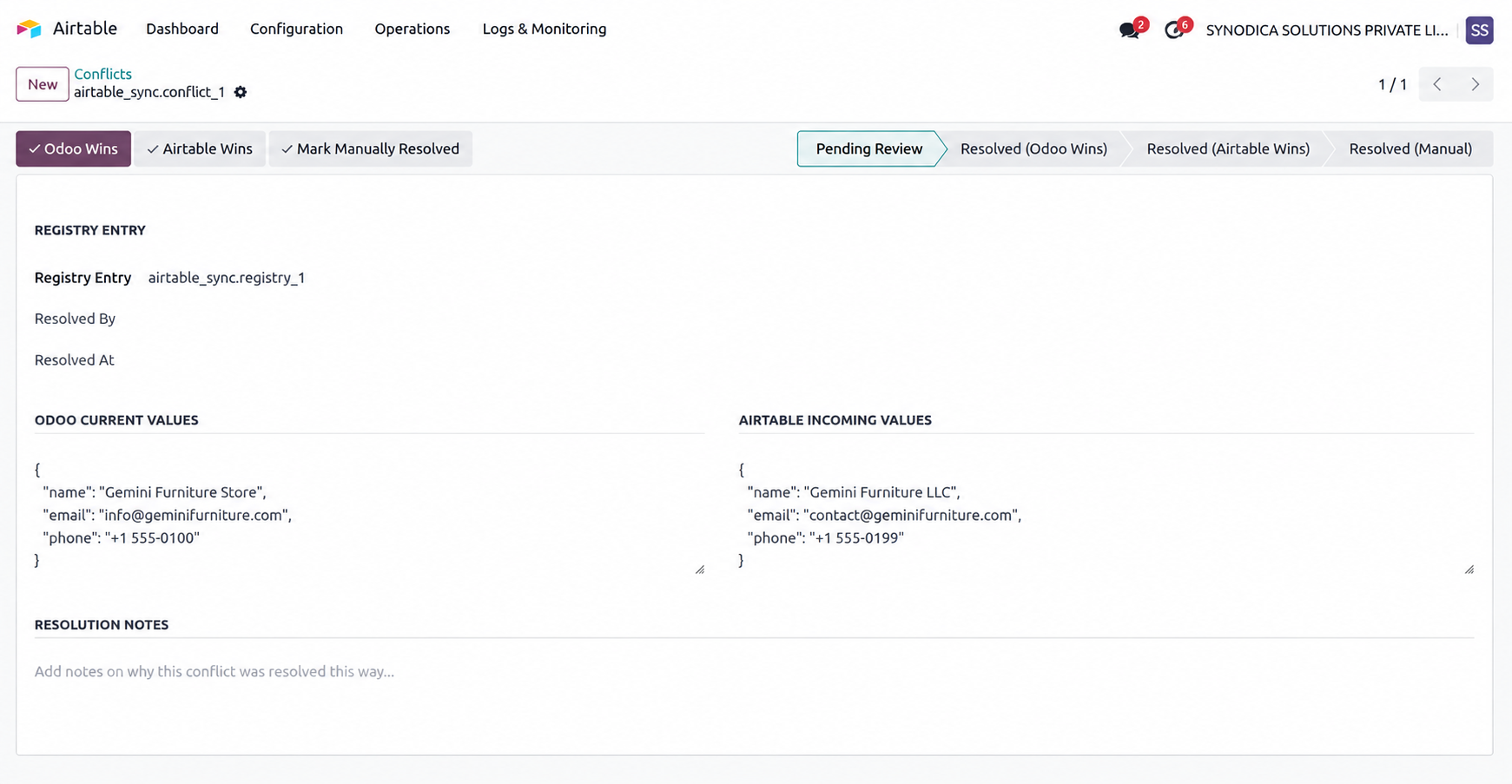
Resolve data overlaps using automated rules or human-in-the-loop decisions.
- Odoo Wins Keeps local Odoo data. The record is flagged to push outbound, overwriting the remote Airtable record on next sync.
- Airtable Wins Applies the remote Airtable field values to Odoo and updates the record in Odoo's database.
- Manual Resolve Closes the conflict ledger entries without automatic writes, allowing custom manual data corrections.
Full Data Control
Take control of your data flow. Benefit from enterprise features designed to keep your business records robust and consistent.
Bi-directional Sync
Set individual mapping models to sync Odoo to Airtable, Airtable to Odoo, or keeps both sides in complete bi-directional synchrony.
Queue-based Workers
Synchronization jobs are managed via an asynchronous worker queue, running in background threads without blocking user sessions.
Auto Table Generation
Create new tables and field columns inside Airtable bases directly from your Odoo mapping setup. No double manual data entry.
Dynamic Domain Filters
Control precisely which records sync. Filter mapped data using Odoo's standard, easy-to-use search domain builder interface.
Relational M2O/M2M Mappings
Maintain links and relationships. Map many-to-one and many-to-many fields to Airtable's linked record structures.
Comprehensive Audit Logs
View complete historical execution traces of synchronised records, payload values, successes, retries, and errors.
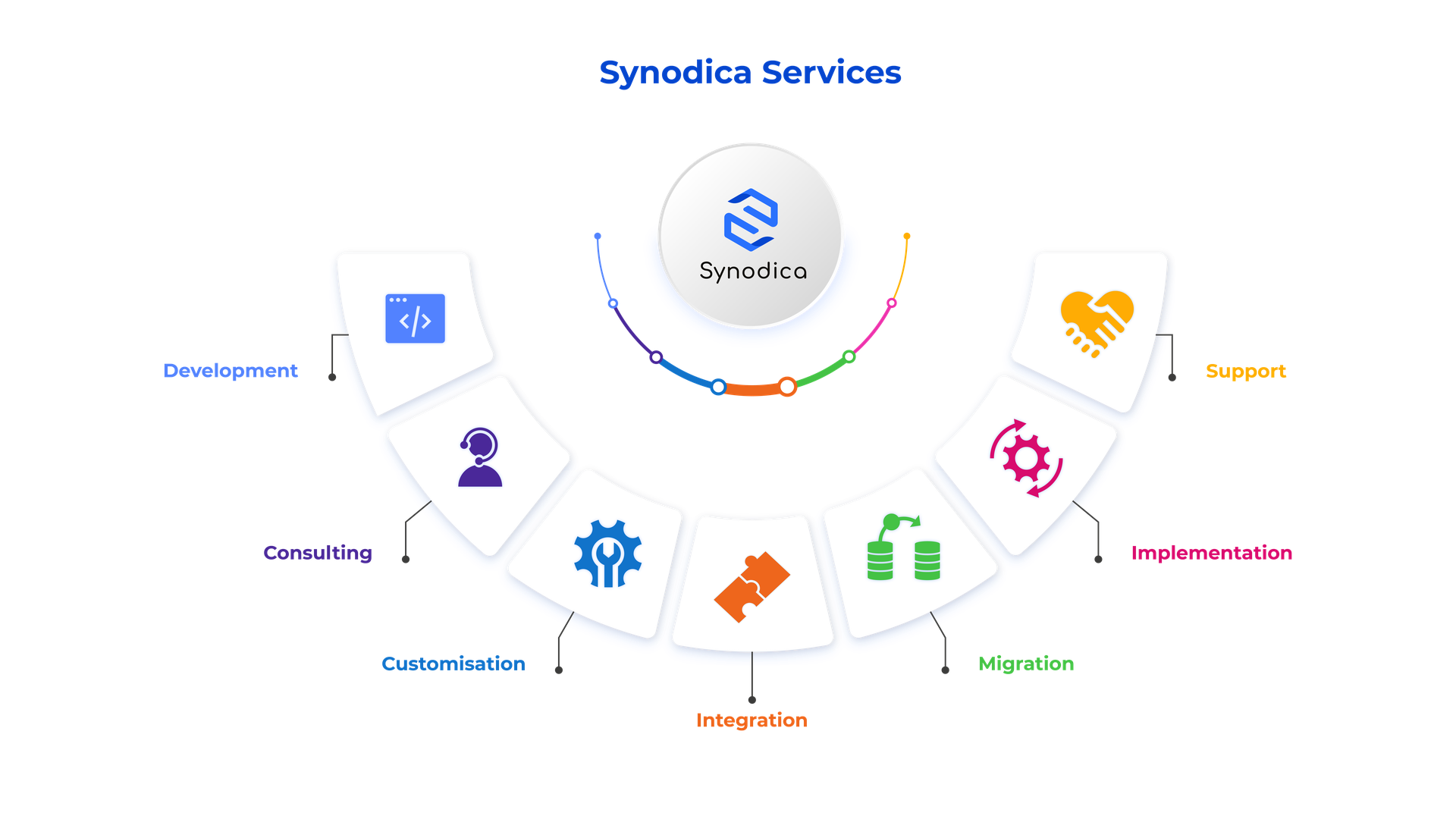
Specialized Odoo Services
We build, customize, and maintain Odoo solutions for businesses worldwide - from implementation to advanced integrations.
Ready to Sync Your Data Seamlessly?
Eliminate manual double-entry. Empower your team by connecting Odoo and Airtable with a robust, background-queued, conflict-resolved integration.
© 2026 Synodica Solutions PVT. LTD. - Airtable Connector for Odoo 18
We create ERP solutions for you using Odoo ERP that will build a strong and efficient business for you. It's SYNODICA WAY